

City/County Vehicle Gallery


How to Start a New Topic or Message
- Views 11.7k
- Created
- Last Reply

A better way to browse. Learn more.
A full-screen app on your home screen with push notifications, badges and more.

By using this site, you agree to our Terms of Use.
Video tutorial: EnterNewtopic.mp4
ENTER A NEW QUESTION OR TOPIC
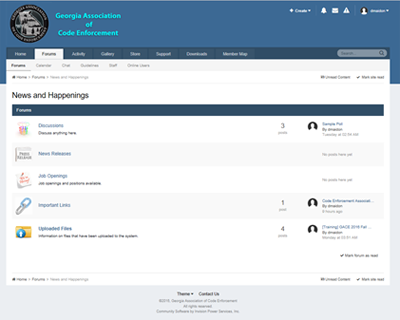
When you first access GACE Online forums, you will see the following page. This is the main screen. You should see the category titled, “News and Happenings”. Under that category there are 5 sub-categories, “Discussions”, “News Releases”, “Job Openings”, “Important Links”, and “Uploaded Files”. Click on the sub-category that you wish to ask your question of just read the questions that have been asked.
You may also click on the “News and Happenings” category and you will see the screen below. You will need to click the sub-category from that screen.
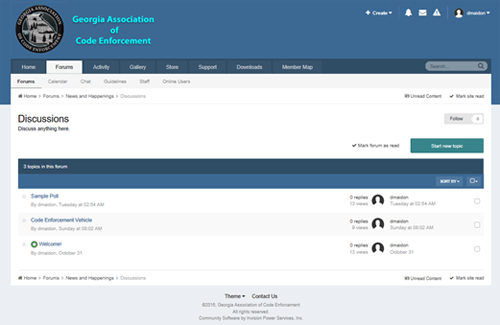
For instance, you wish to ask a question or start a new discussion in “Discussions”. You would click on the “Discussions” sub-category and you will see the screen below. Click on the “Start New Topic” button on the right side of the screen.
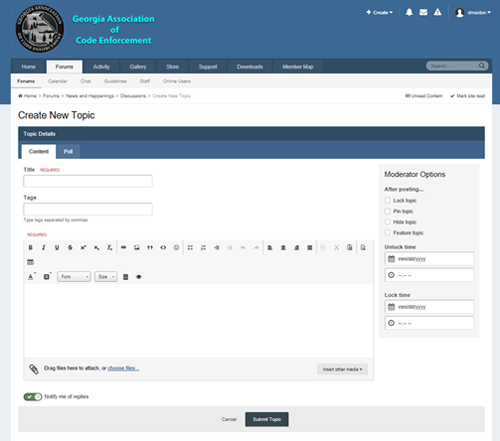
The screen to post new messages will appear.
Enter your name and the Topic Title. In the box at the bottom of the screen, you would post your question or any comments that you would like to make. Each item marked “REQUIRED” must be completed. These include “Title” and the message content box.
Once you have finished composing your message, click the “Submit Topic” button and the message will be save.
How to Start a New Topic.pdf
---
Dennis N. Maidon
Webmaster - GACE Online
dmaidon@gaceonline.com