





Volume II Chapter 4 (September 27, 2024) Let's Be a Follower

By Dennis Maidon in Forums Participation
· 694 views
As I write this entry, Hurrican Helene has made it to Western North Carolina. It has brought a lot of rain the NC mountains but, nowhere near the devastation to Florida and Georgia. My hope is that all GACE Members and their families are safe and now out of harm's way.
---
OK, now to the gist of this blog, "Let's Be a Follower".
At the top of each forum, event, topic, Blog or whatever feature that you will find on the GACE Forums, there is a "Follow" button.
This is a very important button. It allows you to follow that particular feature or topic and receive updates, if you want them. For instance, most posts on here are in the "Discussions" forum under "News & Happenings". Click on the Follow button on the Discussions forums and you can receive notification each time a new topic appears. Once you have followed a feature, the button turns to "Following".
You have some options when you are a follower.
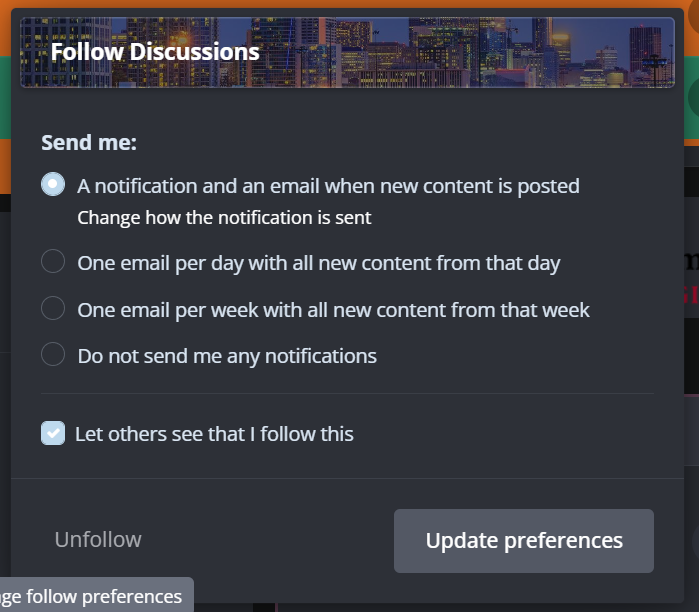
Here are your options:
-
You will receive a notification and an email whenever new contest is posted. The notifications will appear in the User Bar at the top of the screen.

- You can opt to receive a single email with all the content for that day, if there was any new content.
- Maybe you would only like one email each week. You have that option, if you like.
- You can also follow and not receive any notification at all.
Choosing the first option is the beast as it will keep you up to date on the GACE Forums.
Interested in checking on a new job or, just being aware of what your options are, follow the "Job Openings & Positions" topic. Each time you click the Follow button, you get 3 points added to your reputation score. The more points you get, the higher your rank on the GACE Forums.
In short, sometimes it does pay to be a Follower.
-
 1
1
Recommended Comments